

- Dynamics 365 F&O
- X++
- Database refresh
- Business events
- Azure DevOps
- Pipelines
- Open source
Balsoft Data Refresh: prepare D365 F&O after every database copy
Users, roles, SMTP, endpoints, batch jobs, cleanup: our open source model and a sample copy pipeline prepare D365 F&O after every database refresh.

On this page+
Every database refresh ends the same way. Production data arrives in the UAT sandbox, and then someone spends the next hour in System administration: enable the testers again, give them their roles back, point the SMTP server and the integration URLs at the test systems, recreate the business event endpoints, release the batch jobs that should run and leave the rest on hold. Do it by hand and something is forgotten. A forgotten SMTP setting sends test mails to real customers. A forgotten URL sends test orders to the production warehouse.
For years we have done this step for our customers with our own tooling, after every copy. We have now rebuilt that tooling as one clean product and decided to give it to the Dynamics 365 community: Balsoft Data Refresh.
What a copy leaves behind
Microsoft documents what a database refresh does not copy or resets on purpose, so that a sandbox does not act like production right after the copy. That is the right default, but the work that follows is always the same for a given environment, and Microsoft leaves it to you. Balsoft Data Refresh closes each of these gaps, and the last row is what makes it fit into any release process:
All users except Admin are disabled.
Enable users
Enables the testers and key users of this environment.
Testers have only the roles they have in production.
Assign security roles
Adds the roles they need for testing.
Open workflow instances come over from production.
Cancel pending workflows
Stops approvals that belong to production.
SMTP relay, e-mail addresses and print settings are not copied; integration URLs still point to production.
Set field values
Writes the values of this environment into any table field.
Business event and data event endpoints are removed.
Create business event endpoints
Recreates them and activates their events.
All batch jobs are set to Withhold.
Release batch jobs
Puts the jobs that should run back to Waiting.
The sandbox carries the full production data.
Clean up data
Deletes old journals and empties staging tables.
Someone has to sign in after every copy and do all of this by hand.
Run from outside with one service call
Any system that can send an HTTP request runs every task: Azure DevOps, GitHub Actions, a PowerShell script or your own tool. The call returns the result of each task.
Set it up once, in production
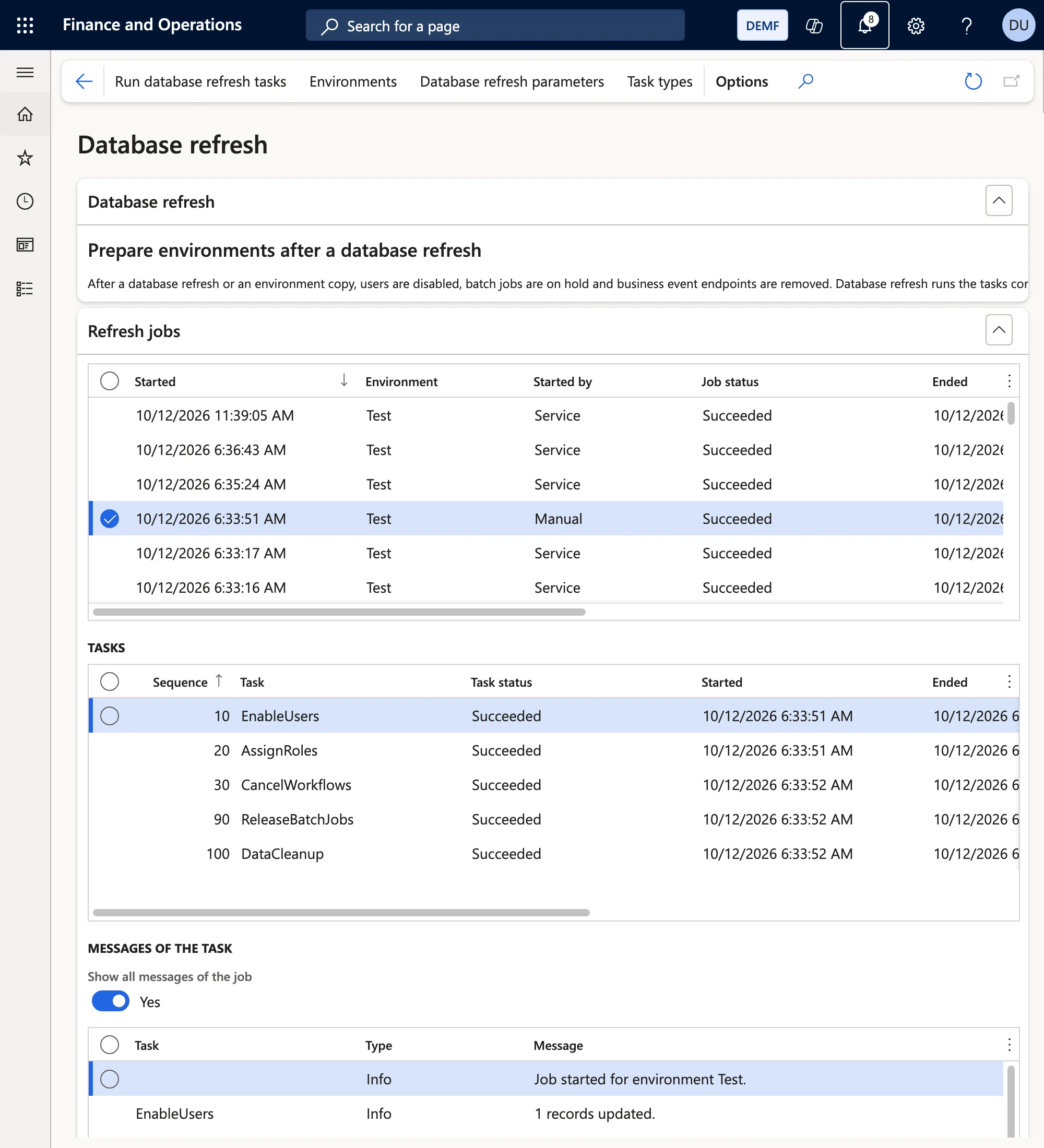
In Finance and Operations the feature is called Database refresh. It has its own module in the navigation and a workspace.
The setup tables are copied with the database. So you maintain the setup of all environments in production, and every copy brings it along. In the target, Balsoft Data Refresh only runs the part that belongs to that environment.
Environments are identified the way Microsoft does it in the monitoring and telemetry parameters: by environment ID (the Power Platform environment ID, or the LCS environment ID) and an environment mode. Add current environment fills in the ID of the instance you are on. Each environment gets its tasks, which you switch on and put in order.
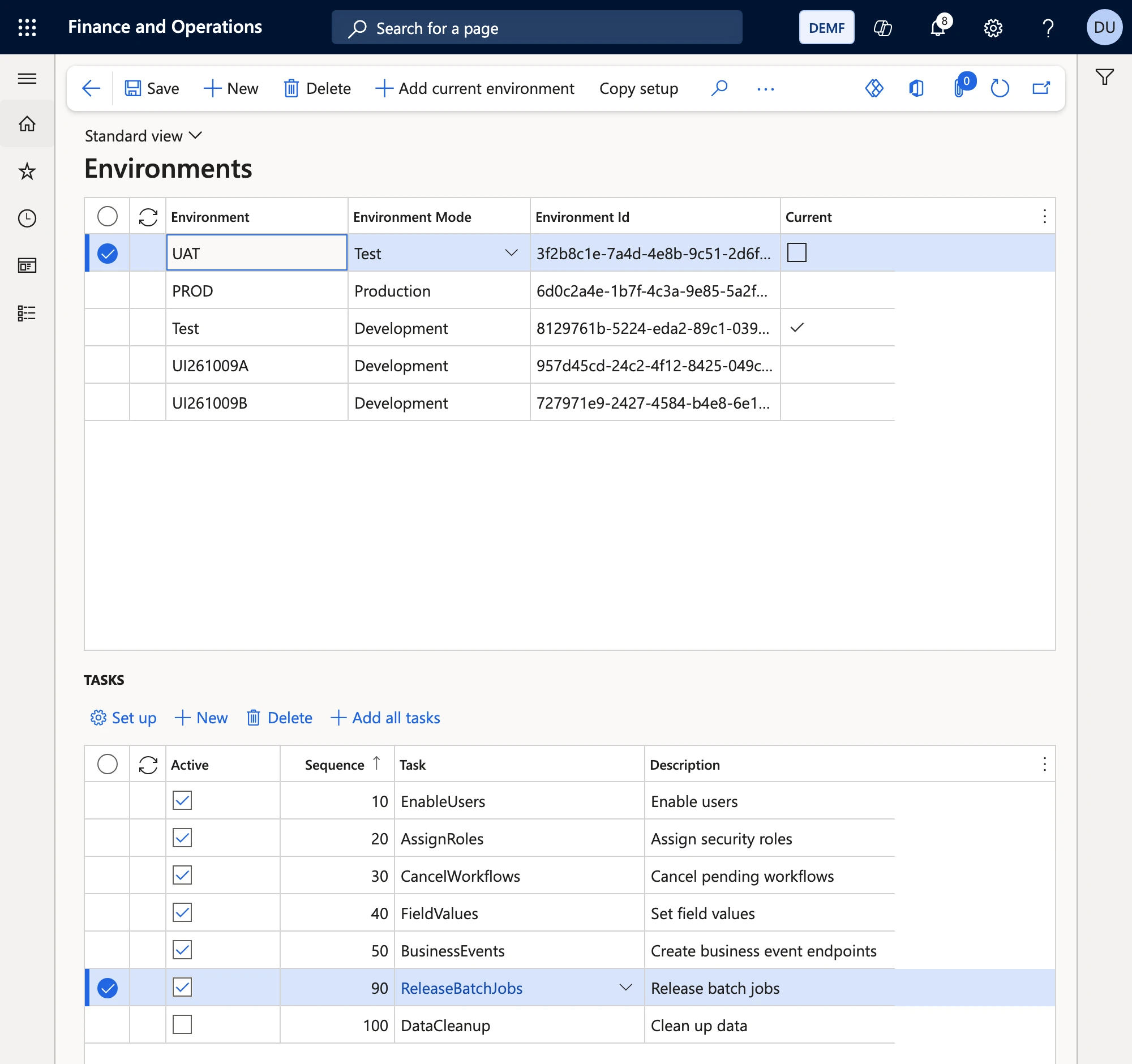
A failed task does not stop the job unless Stop on first error is set. Every run is recorded as a job with the result of each task and its messages.
The tasks, one by one
Each task has a small setup form of its own, opened with Set up on the task. Here is what each one does and when you need it.
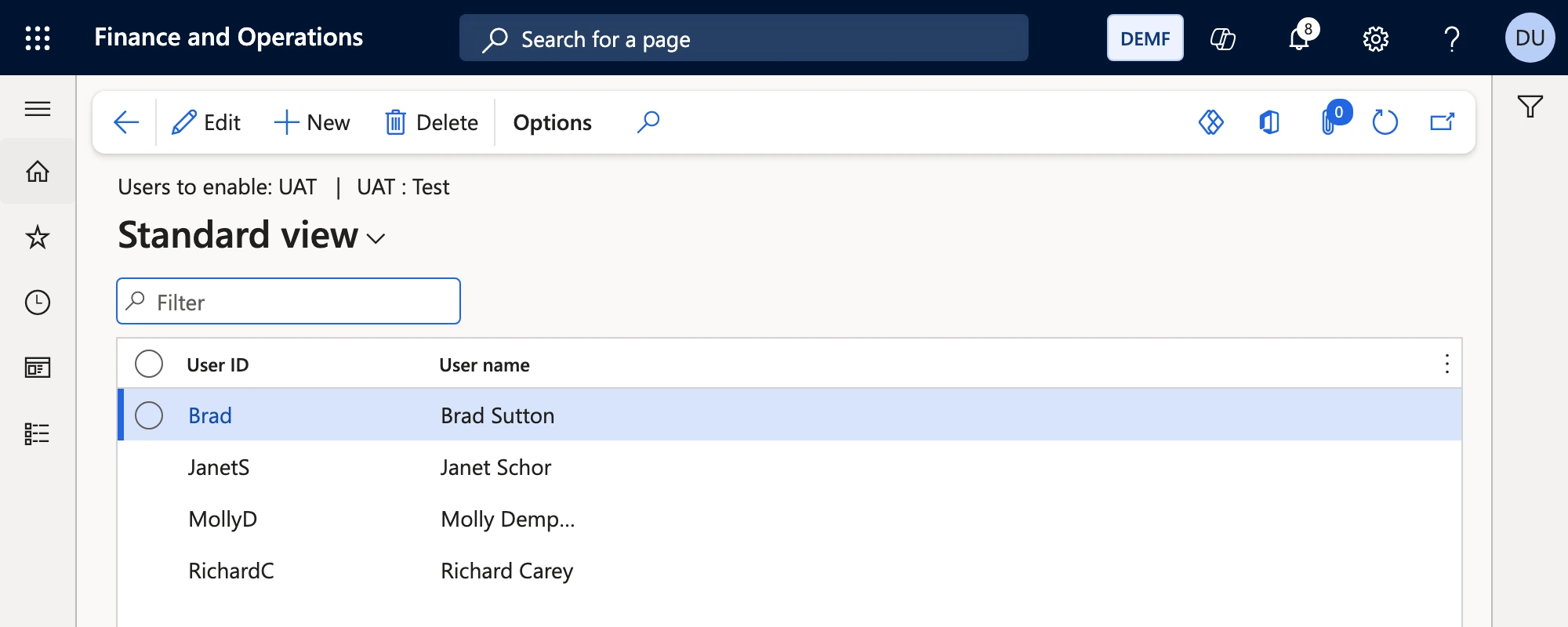
Enable users
After a copy only Admin can sign in. This task enables the users you list for the environment, for example the key users and testers of UAT. Every other user keeps its state, so production users who should not work in the sandbox stay disabled. The setup is one grid with the user ID.
Assign security roles
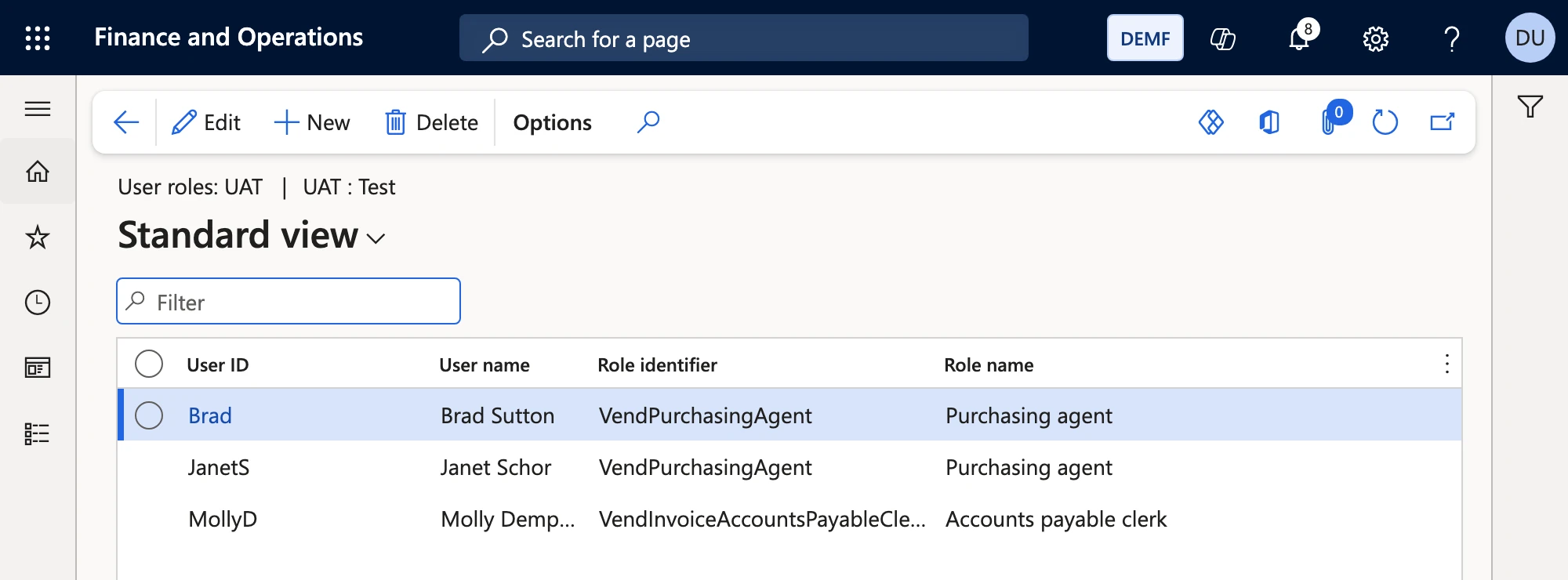
Testers often need roles in UAT that they do not have in production, for example a key user who tests the approval workflow as approver. This task assigns roles per user and environment, or enables an assignment that is disabled. Roles are stored by their AOT name, which is the same in every environment, unlike the record ID. The form shows the role label, so you still pick "Accounts payable clerk" and not a technical name.
Cancel pending workflows
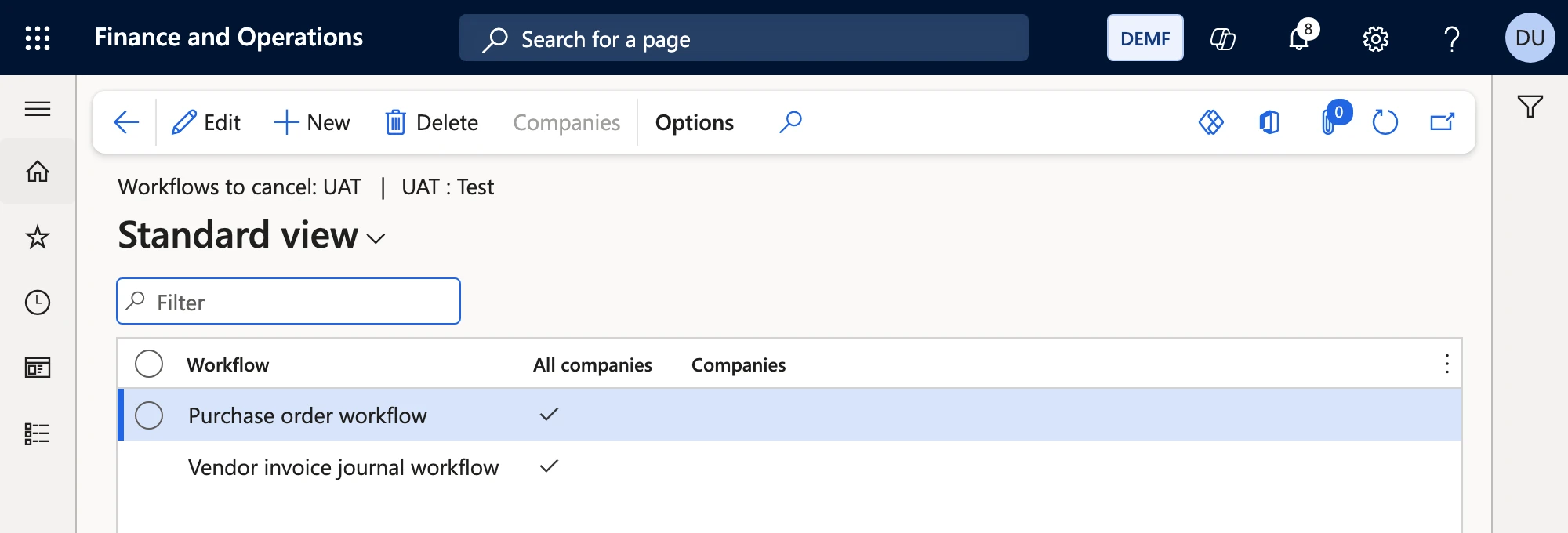
The copy brings every open workflow instance from production. If they keep running in the sandbox, approvers get tasks and mails for documents that belong to production. This task cancels the pending instances of the workflows you list, or of all workflows when the row has no workflow, in all or in selected companies. It only acts on what is set up: without a row it changes nothing.
Set field values
This is the task that replaces the data package. It writes any value into any table field: the SMTP relay server, the URL of an integration, a file share, a parameter that must differ in test. An optional Only where field with Has value limits the change to matching records, and each row has All companies or a list of companies.
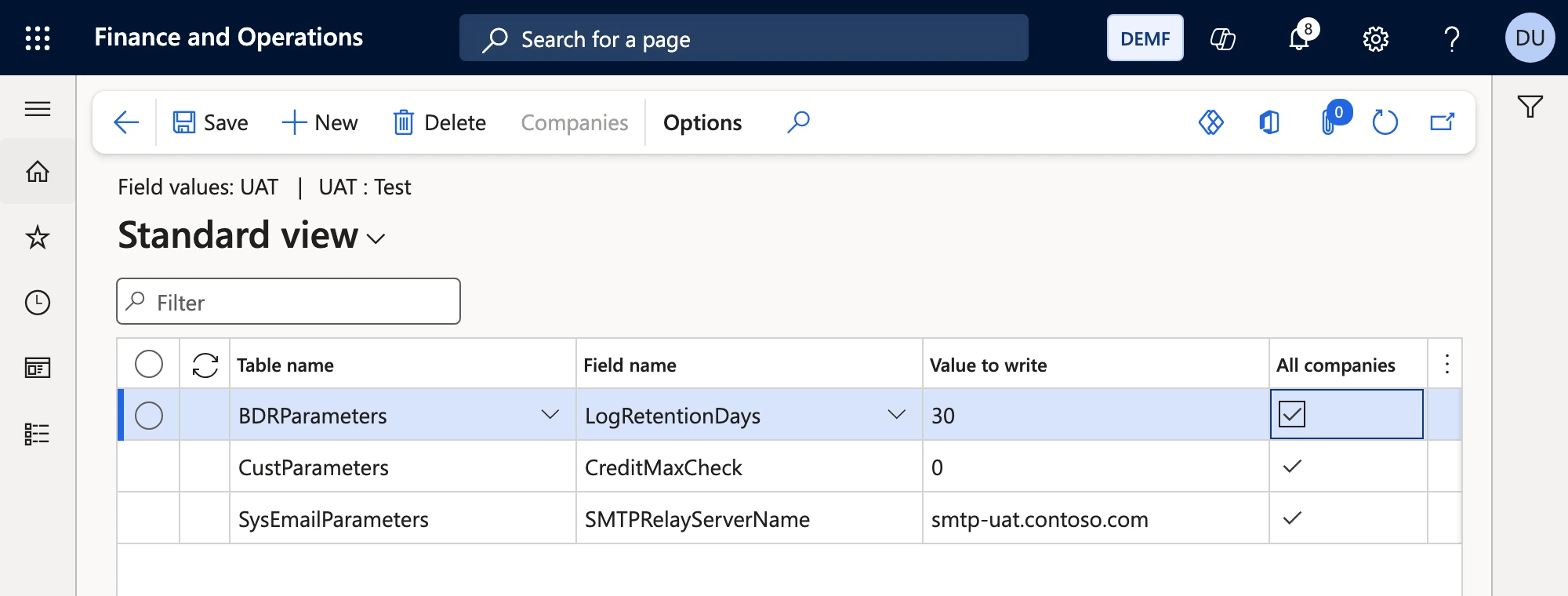
Every row is checked when it is saved, not during the next refresh: the field must exist and must not be a system field, the value must fit the field type, and a table that stores no data is refused. For a sensitive value, such as a password of an integration, the row only names a pipeline secret and the pipeline passes the value at run time.
Create business event endpoints
Endpoints are the part people dread most after a copy, because each one needs a Key Vault, an app registration and a client secret. This task creates endpoints of every Azure type (Service Bus queue and topic, Event Grid, Event Hub, Blob storage) through Microsoft's own endpoint classes and activates their business events in the companies of the endpoint. They show up in the standard Business events workspace exactly as if you had created them there.
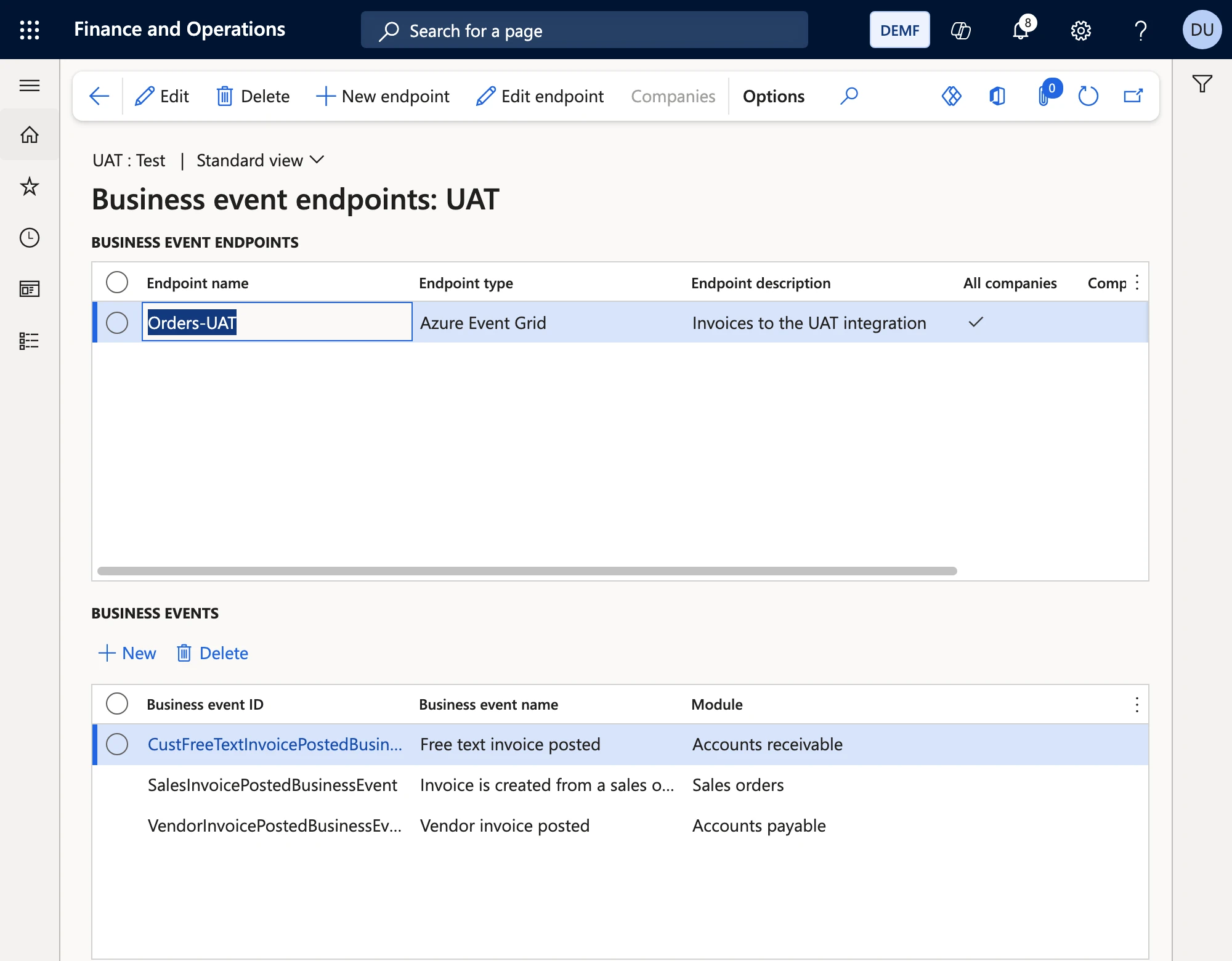
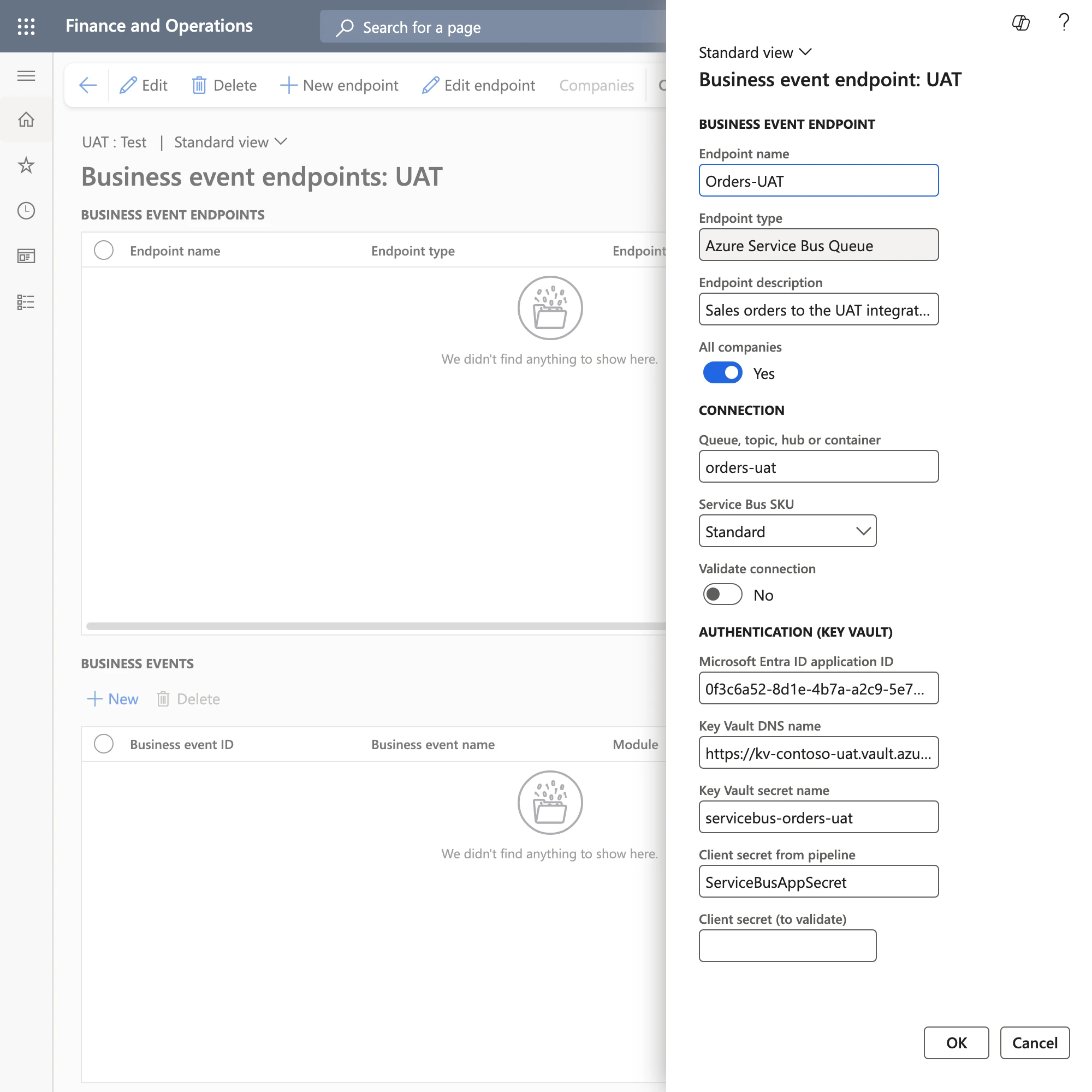
The client secret is never stored. The setup row only names it, and the pipeline passes the value with the service call. When you save an endpoint, Balsoft Data Refresh sends Microsoft's test event to it, so a typo in a queue name shows up while you set it up and not after the next refresh.
Release batch jobs
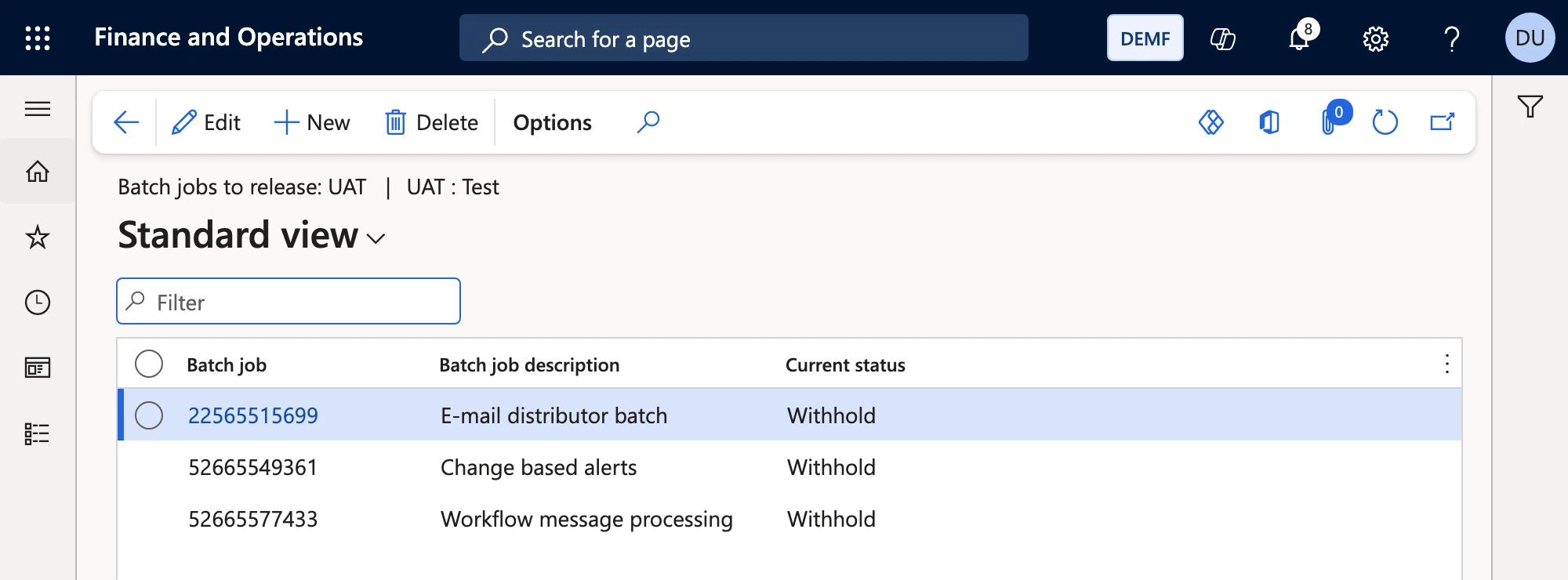
The copy puts every batch job on Withhold, which is good: nothing runs that should not. But some jobs must run in UAT, for example workflow processing, the e-mail distributor or alerts. List them here and the task puts them back to Waiting. All other jobs stay on hold.
Clean up data
A UAT copy of production is large, and testers rarely need five years of journals. Cleanup rules work in three modes: Delete older records keeps a number of days, Delete all records empties a table in all or in selected companies, and Truncate table empties it for all companies at once. Delete actions are followed by default, so the lines of a journal go with its header.
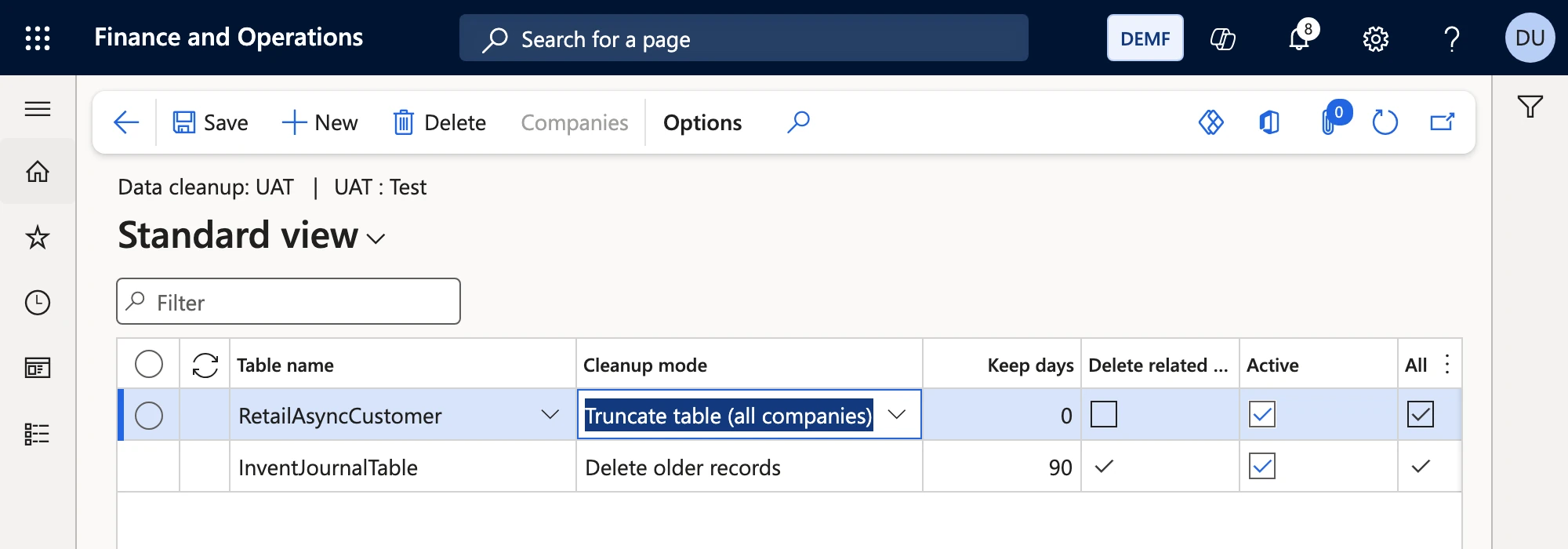
Only transaction, worksheet, staging and miscellaneous tables can be chosen. Master data and parameters are not on the list. Long cleanups run in batch, and the tasks after them follow in the same batch job so the order is kept.
Automate the copy with a pipeline
You can start a run from the menu, but Balsoft Data Refresh is built for one thing above all: a refresh that runs without anyone touching it. The repository contains a sample Azure DevOps pipeline, Pipelines/copy-and-refresh.yml, that does the whole job:
Approve
Copy
Wait
Run
Follow
Report
Run it on demand before a test phase, or uncomment the schedule for a weekly refresh. The core of the pipeline is short:
stages: - stage: Copy jobs: - deployment: copy environment: CONTOSO-UAT # approval before the sandbox is overwritten timeoutInMinutes: 360 strategy: runOnce: deploy: steps: - task: PowerPlatformToolInstaller@2 - task: PowerPlatformCopyEnvironment@2 inputs: authenticationType: PowerPlatformSPN PowerPlatformSPN: CONTOSO-PROD # service connection of the source TargetEnvironmentUrl: https://contoso-uat.crm4.dynamics.com CopyType: FullCopy - stage: Refresh dependsOn: Copy jobs: - job: refresh steps: - task: PowerShell@2 inputs: pwsh: true filePath: Pipelines/scripts/Invoke-DatabaseRefresh.ps1 arguments: >- -FinOpsUrl https://contoso-uat.sandbox.operations.eu.dynamics.com -TenantId $(TenantId) -ClientId $(ClientId) -EnvironmentId UAT -SecretNames ServiceBusAppSecret -RequestId $(Build.BuildId) env: BDR_CLIENT_SECRET: $(ClientSecret) BDR_SECRET_ServiceBusAppSecret: $(ServiceBusAppSecret)The script sends this request to POST /api/services/BDRServices/BDRService/run:
{ "_request": { "EnvironmentId": "UAT", "TaskTypeNames": [], "RequestId": "<pipeline run ID>", "RunInBatch": false, "ReturnResultOnFailure": true, "Secrets": [ { "Name": "ServiceBusAppSecret", "Value": "<from the pipeline>" } ] }}An empty TaskTypeNames runs all active tasks of the environment. The result lists every task with its status, records affected and message. A repeated call with the same RequestId returns the first job instead of running again, so a retry after a timeout is safe. Without ReturnResultOnFailure a failed job comes back as an HTTP error, so even a simple pipeline that only checks the status code does not open the environment after a failed run.
Before the first run you need three things, all listed at the top of the pipeline file:
- A Power Platform service connection for the source environment, with a service principal that may copy environments.
- A variable group
DatabaseRefresh, ideally linked to Azure Key Vault, with the tenant ID, client ID and client secret of an Entra ID application, plus one secret per secret your setup names. Register that application in the sandbox under System administration > Setup > Microsoft Entra ID applications, with a user that has the role Database refresh administrator. Because the setup comes from production, register it there and the copy brings it along. - An Azure DevOps environment for the sandbox with an approval.
A copy of a Finance and Operations environment can take several hours, and a job on a Microsoft-hosted agent stops after 6 hours. For longer copies use a self-hosted agent, or start the copy in the Power Platform admin center and run the pipeline with skipCopy, which only runs the refresh. The script also works on its own, from any machine with PowerShell. For an LCS environment, replace the copy stage with a refresh through the LCS Database Movement API; the refresh stage stays the same.
Safety first
A tool that writes into a freshly copied database must not run in the wrong place:
- It never runs in an environment with the mode Production. The check is in the job itself, so it also applies to service calls.
- It only runs when the current instance is set up as an environment, and the environment ID in a service call must match the instance.
- Enable users and Cancel pending workflows only act on what is set up. Without setup they change nothing.
- One job per environment at a time. A second call is refused while a job is running or scheduled.
How we test it
After every release the model is deployed to a unified developer environment, and a suite of more than 300 end-to-end checks runs against it through the web client and the service: every setup form, every validation, real endpoints of every Azure type with Microsoft's test event, service runs, and the cleanup of everything the tests created.
That suite found a bug that is worth knowing about if you write X++ against business events. BusinessEventsEndpoint::findByName goes through the record cache of the endpoint tables. After an endpoint was deleted in the Business events workspace, it could still return the deleted record, so our task skipped the endpoint as "already exists". Reading the table with the cache switched off fixed it:
private RefRecId existingEndpoint(BusinessEventsEndpointName _endpointName){ BusinessEventsEndpoint standardEndpoint; standardEndpoint.disableCache(true); select firstonly RecId from standardEndpoint where standardEndpoint.Name == _endpointName; return standardEndpoint.RecId;}Get it
The model, the setup guide, the copy pipeline and the build and release pipelines are on GitHub. Deploy the model, assign the role Database refresh administrator, set up one environment in production and let the pipeline do the next refresh.
The task types are plugins, built like Microsoft's data archive feature. If you need a task we do not have, add it in your own model without changing ours. Bug reports and ideas are welcome as GitHub issues. If you want help to fit it into your release process, talk to us.
